Is BANGER.deals free?
Yes. Free, no account, no subscription – there’s a small ad space in the panel instead.
Which sites does the price comparison work on?
Product pages of most online stores. On home pages, searches and lists the panel stays quiet and says so.
Where does it compare?
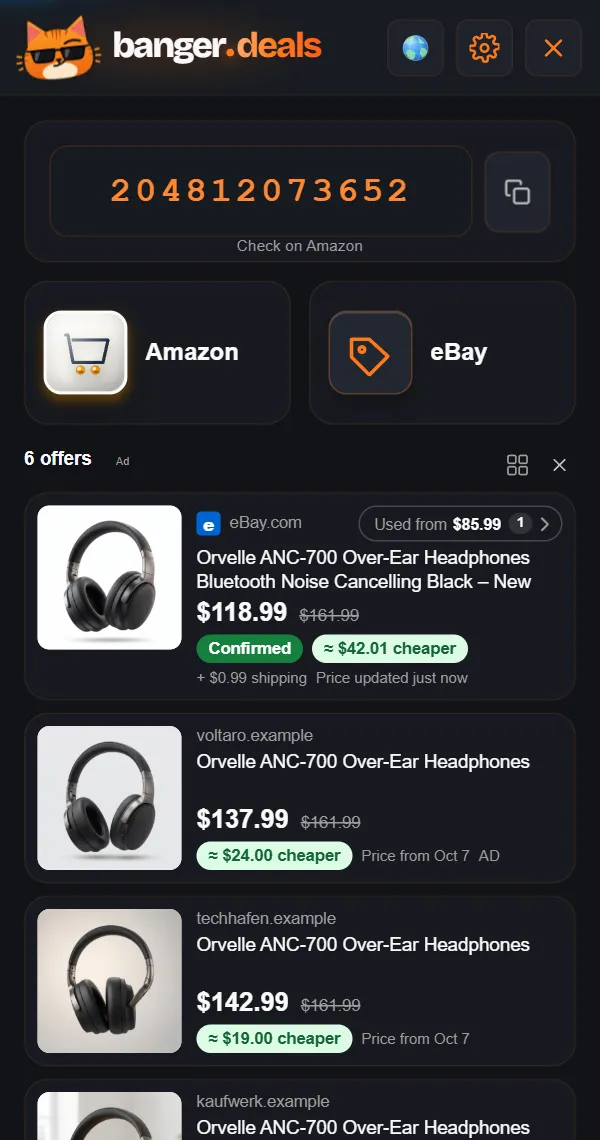
On shop pages: on eBay (14 countries to pick) and in other shops, and Amazon opens in one click. On Amazon product pages: the same item in 23 Amazon countries – with shipping, duty and coupons.
Which Amazon countries does it compare?
23 Amazon countries: all nine EU Amazons (Germany, France, Italy, Spain, Netherlands, Belgium, Ireland, Sweden, Poland), plus the UK, Turkey, the US, Canada, Mexico, Brazil, Japan, India, Australia, Singapore, the UAE, Saudi Arabia, Egypt and South Africa. You choose which countries are in the list.
Are Amazon coupons clipped automatically?
Yes, if you are signed in to Amazon: BANGER.deals clips an available coupon on the product page or when you add to cart. It costs nothing – the coupon only applies if you actually buy. You can switch it off in the gear menu.
Does it include duty and import VAT?
For buys from the UK and the US the panel shows duty, import VAT and Amazon’s exchange fee – Amazon’s own figures or our estimate, clearly marked “~”. What is still open is shown, and such prices never count as the best price.
Is it really the same product?
Every eBay hit carries a label: Confirmed, Very likely, Likely or Different model. On “Likely” and “Different model” we don’t count any savings.
Does it show used items too?
New by default. “Used from” shows the cheapest used or refurbished offer on click. You choose which conditions count, in the gear menu.
What is an EAN or UPC?
The EAN (13 digits, common in Europe) and the UPC (12 digits, common in the US) are the numbers under a product’s barcode; GTIN is the umbrella term. Each is meant to identify one product variant worldwide – which is why it usually finds the same product in other shops.
Does it find the UPC, EAN or GTIN?
Where the shop has it, yes – even if it is hidden. You get the code the shop lists for the variant you picked, copied in one click. If the shop lists none, you see a “Likely EAN” where possible, clearly marked. Before an important purchase, compare it with the box or data sheet.
Why isn’t the code enough on eBay?
Plenty of matching listings don’t carry the code – and the code alone often won’t get you the cheapest one. So we also go after your product directly. And with no code at all, the Amazon button still has the keywords that hit.
How do I find the cheapest offer on eBay?
By hand: search with the code and the product name, filter for “Buy It Now” and “New”, sort by “Price + Shipping: lowest first” – then weed out accessories, spare parts and bundles. BANGER.deals does that for you from any shop page and puts the cheapest matching offer first.
Is it always cheaper?
No. Sometimes the price you are looking at is already the best one – and the panel shows that too. Banger the cat only smiles at real savings.
Which browsers is the extension for?
Google Chrome on desktop – as a popup, side panel or in-page bar. Via the Chrome Web Store also in Edge, Brave, Opera and Vivaldi. Firefox and Safari on desktop are next.